
Description
PawaPay Payment Forms for WordPress – Accept Mobile Money Payments Without WooCommerce
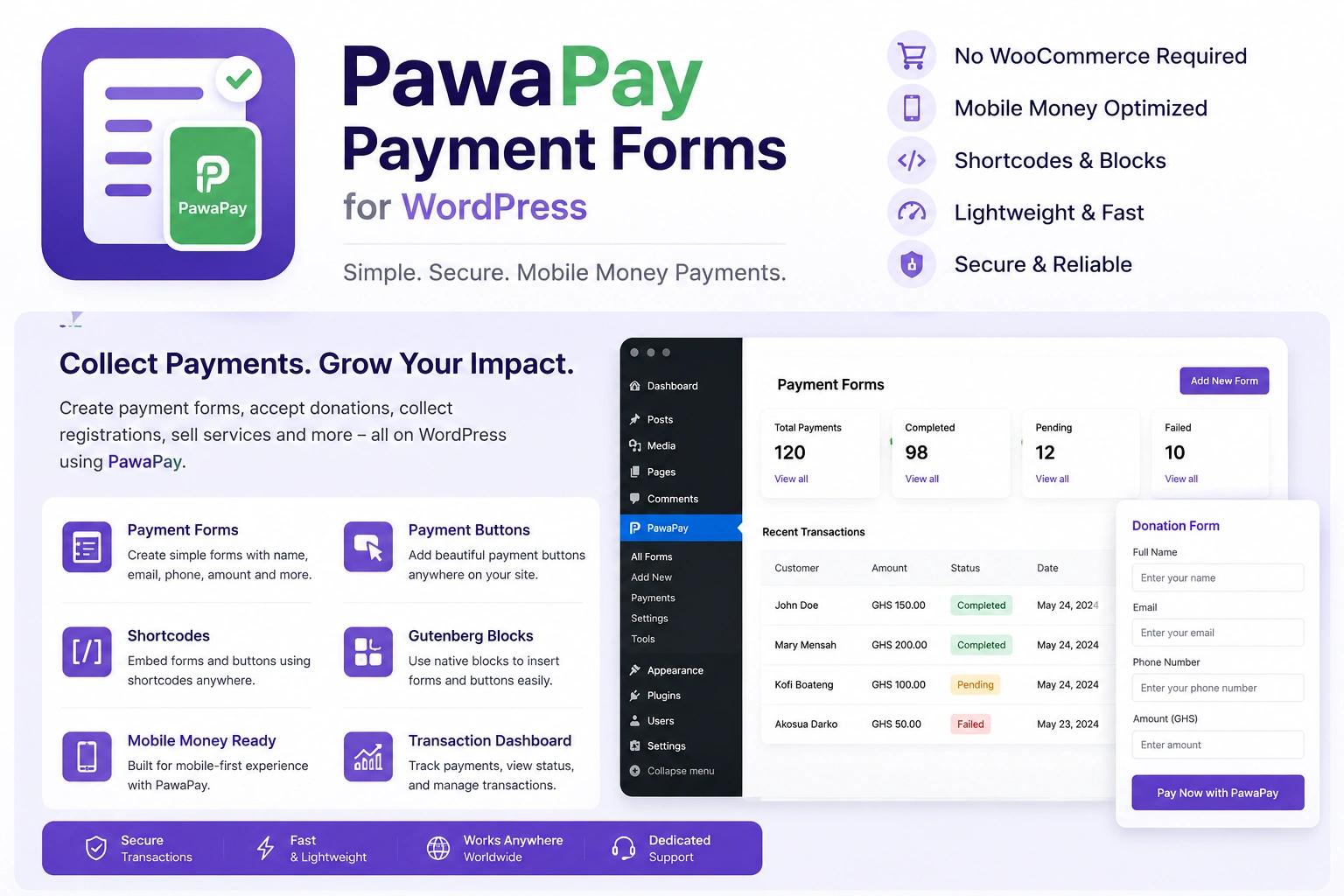
Accept mobile money payments directly on your WordPress website with PawaPay Payment Forms for WordPress.
Whether you want to collect payments, receive donations, register event attendees, or accept bookings, this plugin gives you a simple way to create and manage payment forms without needing WooCommerce.
Build customizable forms in minutes and embed them anywhere on your website using shortcodes. Your customers can pay using their mobile money wallets through PawaPay’s secure hosted payment page.
Once a payment is confirmed, the transaction is automatically recorded in your WordPress dashboard, and a payment receipt is sent to the customer.
With built-in form creation, booking management, email notifications, payment tracking, and refund tools, PawaPay Payment Forms provides a convenient payment solution for different types of WordPress websites.
Key Features of PawaPay Payment Forms
1. Multiple Payment Form Types
Create different types of forms depending on what you need to collect payments for.
Supported form types include:
- Payment Forms: Collect payments for products, services, and other transactions.
- Donation Forms: Accept voluntary contributions and donations.
- Event Registration Forms: Collect payments from people registering for events.
- Booking Forms: Accept payments for appointments, reservations, and scheduled services.
- Custom Forms: Build forms for other payment collection needs.
One plugin gives you the flexibility to handle different payment collection activities from your WordPress dashboard.
2. Flexible Payment Form Builder
Create payment forms that match your business or organization’s needs.
- Set a fixed payment amount.
- Allow customers to choose their own payment amount.
- Configure minimum payment amounts.
- Add custom form fields.
- Generate shortcodes to display forms on any WordPress page or post.
- Use a separate Pay Button shortcode when needed.
You can create your forms and place them wherever you want without being restricted to a specific page or layout.
3. Multiple Countries and Languages
Accept payments from customers in different supported markets.
- Configure a single country for a form.
- Support several countries on one form (requires an active license).
- Allow customers to select their country.
- Automatically set the currency based on the selected country.
- Validate customer phone numbers.
- Support English and French payment pages.
This makes it easier to collect payments from customers across multiple supported countries.
4. Booking and Appointment Management
Manage bookings directly from your WordPress dashboard with built-in scheduling features.
- Configure business working hours.
- Set available booking time slots.
- Block specific dates and days.
- Display a booking calendar.
- View and manage your bookings from a dedicated bookings list.
Whether you offer consultations, appointments, or scheduled services, you can manage booking availability alongside your payment collection.
5. Payment Processing and Refund Management
Keep your payment transactions organized with built-in payment management tools.
- Secure hosted PawaPay payment page.
- Automatic payment confirmation.
- Complete transaction list.
- Detailed transaction information.
- Process refunds directly from your dashboard.
- Free sandbox testing mode.
- Live payment mode.
Customers complete their transactions through PawaPay, while payment confirmations and transaction records are managed automatically.
6. Customizable Email Notifications
Keep customers and administrators informed about payment activities.
- Automatically send customer payment receipts.
- Send payment notifications to administrators.
- Customize email messages using available tags.
- Add your own logo to email notifications.
- Configure a custom email footer.
- Send test emails before using your configuration.
Customize your email notifications to maintain consistent branding and provide customers with clear payment confirmations.
7. Easy Setup and Payment Monitoring
Get the tools you need to configure and monitor your PawaPay integration.
- Setup health check.
- Copy-and-paste callback URL configuration.
- Last callback received information.
- Payment summary.
- Step-by-step setup guide.
Quickly review your integration setup and monitor important payment activity from your WordPress dashboard.
8. Payment Security and Protection
PawaPay Payment Forms includes several features designed to protect your payment workflow and administrative settings.
- Payments verified directly with PawaPay.
- API tokens are not displayed again after being saved.
- Hidden spam trap to help prevent automated submissions.
- Configurable payment limits per phone number.
- Protected administrative actions.
Customers complete payments through PawaPay’s secure hosted payment page, helping keep payment processing separate from your website.
9. Your Forms and Payment Data
Maintain control over your stored forms and payment records.
- Forms and payment records are retained if you deactivate or delete the plugin.
- Optional full data deletion when you want to completely remove the plugin’s stored data.
This gives you more control over your website data when managing your WordPress installation or changing plugins.
Sandbox Testing and License Information
You can test your PawaPay integration using the sandbox environment for free before accepting live payments.
Sandbox Mode
- Free sandbox testing.
- Test your forms and payment integration.
- Verify your setup before accepting real transactions.
Live Mode and Licensing
An active license is required for:
- Live payment mode.
- Using several countries on a single payment form.
- Plugin updates.
- Technical support.
- Access to licensed features.
Important: WooCommerce is not required to use PawaPay Payment Forms. You can create and publish payment forms directly on your WordPress website.
System Requirements
Before installing PawaPay Payment Forms, make sure your website meets the following requirements:
- WordPress 5.9 or newer.
- PHP 8.0 or newer.
- An active PawaPay Merchant Account.
WooCommerce is optional and not required.
Why Choose PawaPay Payment Forms for WordPress?
Not every WordPress website needs a full eCommerce system to collect payments.
With PawaPay Payment Forms, you can create payment forms for donations, bookings, event registrations, and other payment collection activities without installing WooCommerce.
From flexible form creation and multiple-country support to booking management, automatic payment confirmations, and email receipts, the plugin provides the essential tools to collect and manage mobile money payments directly from WordPress.
Start accepting mobile money payments, donations, and bookings on your WordPress website with PawaPay Payment Forms.




Reviews
There are no reviews yet