

Description
Cargo & Logistics – Complete Shipment Tracking and Courier Management PHP Script
Launch your own professional cargo, courier, freight, and logistics website with Cargo & Logistics, a ready-made PHP-based shipment tracking platform designed for shipping businesses and logistics service providers.
Whether you operate a courier company, freight forwarding business, cargo agency, moving service, or shipping startup, Cargo & Logistics gives you the tools to manage shipments and provide customers with a professional online tracking experience.
With its customer-facing tracking portal, powerful administration dashboard, printable shipping documents, email notifications, and customizable website designs, you can manage your shipment operations from one central platform.
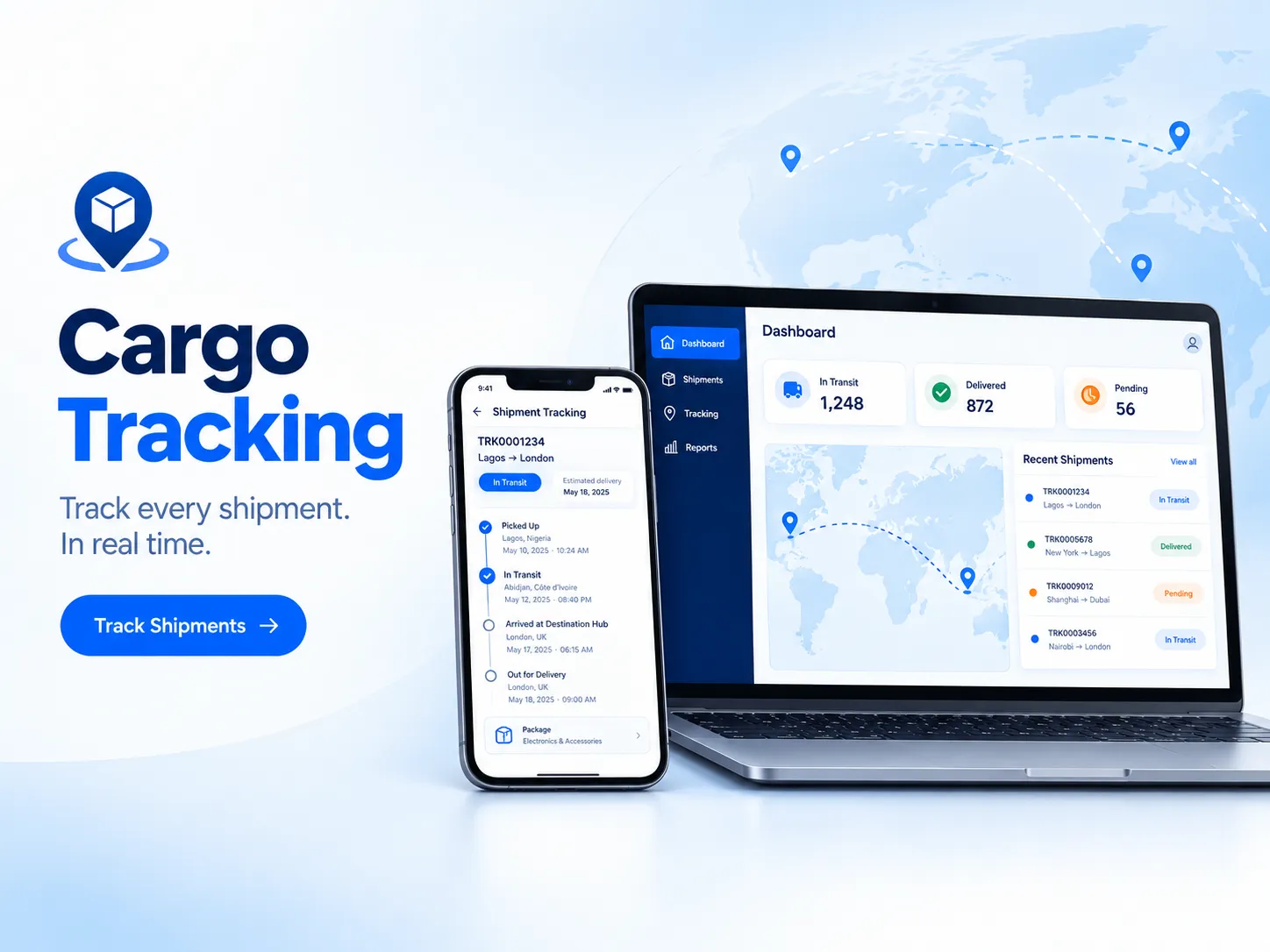
Customers simply enter their tracking number to view shipment progress, check delivery updates, review shipment details, and follow the displayed route on an interactive map. No customer account or registration is required.
The platform runs on your own hosting environment, giving you control over your website, shipment records, and customer information.
Key Features of Cargo & Logistics
1. Professional Online Shipment Tracking
Give customers an easy way to follow their parcels and shipments through your website.
Customers can enter a tracking number to access a dedicated tracking page with important shipment information.
Tracking page features include:
- Unique shipment tracking number.
- Visual shipment progress bar.
- Clear delivery progress steps.
- Complete shipment tracking history.
- Date and time for every tracking update.
- Location information for each update.
- Additional notes provided by the administrator.
- Shipment details and package information.
- Route map showing shipment locations and destination.
- Package image display.
- Shipper and receiver information.
- Partially hidden contact details for privacy.
- Printable shipment receipt.
Customers can check their shipment status at any time without creating an account.
2. Shipment Progress and Tracking Timeline
Make shipment updates easier for customers to understand with a visual tracking experience.
- Display shipment progress using clear delivery stages.
- Show a complete timeline of shipment activities.
- Include dates and times for every update.
- Display the location associated with each update.
- Add custom notes to explain shipment progress.
- Highlight important shipment status changes.
Special On-Hold Shipment Display
When an administrator places a shipment on hold, the tracking page gives the status additional visibility.
- Highlighted shipment hold notification.
- Pulsing visual alert.
- Additional Held step in the tracking progress display.
This helps customers notice important delivery interruptions instead of assuming their shipment is progressing normally.
3. Interactive Shipment Route Map
Give customers a visual overview of their shipment’s route.
- Display shipment locations on a map.
- Show the last known shipment location.
- Display the destination.
- Draw the route using locations entered in shipment updates.
- Visually represent package movement along the displayed route.
The route map helps customers understand where their shipment has travelled and where it is expected to go.
Important: The map is based on the locations entered by your administrator when updating shipment records. It is not a live GPS tracking system.
4. Complete Shipment Management Dashboard
Manage your shipments through a centralized administration dashboard.
- Add new shipments.
- Generate tracking numbers.
- Search existing shipments.
- View shipment details.
- Update shipment statuses.
- Add tracking history entries.
- Manage shipment information.
- Print shipment documents.
- Send email notifications to customers.
The dashboard includes search functionality and quick actions to help you manage shipment records more efficiently.
5. Nine Built-In Shipment Statuses
Track shipments using nine predefined delivery statuses.
Available statuses include:
- Pending.
- Active.
- Picked Up.
- In Transit.
- Arrived.
- Out for Delivery.
- Delivered.
- On Hold.
- Returned.
Update the shipment status as it moves through your delivery process, keeping customers informed about important changes.
6. Printable Invoices and Shipping Waybills
Generate professional shipping documents directly from your administration dashboard.
Invoice Management
- Generate printable shipment invoices.
- Display shipment and customer information.
- Print documents for your shipping operations.
Waybill Management
- Generate printable shipping waybills.
- Three document copies for the shipper, consignee, and carrier.
- Include your own business seal.
- Include signatures.
- Print documents for shipping and record-keeping purposes.
These tools help you maintain organized shipping documentation without relying on separate document creation software.
7. Automatic Customer Email Notifications
Keep customers informed about their shipments through automated email notifications.
The platform supports optional email notifications for:
- New shipment creation.
- Shipment status updates.
Additional email features include:
- Configure your own SMTP mailbox.
- Quick setup for popular email providers.
- Test email functionality.
- Send notifications using your business email address.
Enable notifications when creating shipments or posting new tracking updates so customers can receive important delivery information automatically.
8. Custom Tracking Numbers and Branding
Customize important parts of your shipment tracking system to match your business identity.
- Configure your own tracking number prefix.
- Customize tracking number length.
- Upload your company logo.
- Set your website favicon.
- Configure shipment package image visibility.
- Enable or disable the optional WhatsApp chat button.
Use your own tracking number format to maintain a consistent and recognizable shipment identification system.
9. Complete Logistics Website with Four Homepage Designs
Cargo & Logistics is more than a shipment tracking page. It includes a complete business website that you can customize and launch under your own brand.
Choose from four homepage designs:
- Classic homepage design.
- Modern homepage design 1.
- Modern homepage design 2.
- Modern homepage design 3.
Additional website customization features include:
- Built-in website content editor.
- Edit homepage text.
- Replace website images.
- Customize website links.
- Change website colors.
- Built-in image library.
- Service pages.
- About page.
- FAQ page.
- Contact page.
- Automatically generated sitemap.
- Automatically generated robots.txt file.
Replace the included demo content and images with your own business information to create a professional logistics website.
10. Advanced Administrator Login Security
Protect your administration area with built-in security features.
- Two-step administrator sign-in.
- Authenticator application support.
- Recovery codes.
- Recovery key.
- Protection against repeated incorrect passwords.
- Temporary sign-in blocking.
- Automatic sign-out after a configured period of inactivity.
- Recent sign-in history.
- Optional email alerts for new sign-ins.
These features help protect your shipment management dashboard and administrative access.
11. Easy Installation Wizard
Install Cargo & Logistics on your hosting environment using a guided installation process.
The installation workflow includes:
- Upload the application files.
- Create your database.
- Run the installation wizard.
- Complete the configuration.
- Sign in to your administration dashboard.
The installer checks your hosting environment and identifies missing requirements or settings that need attention before installation can continue.
You do not need to manually guess which server requirements are missing.
12. Built-In Software Updates and Backup Management
Maintain your application with integrated update and backup functionality.
Software Update Features
- Check for available updates.
- Create an automatic backup before updating.
- Install available software updates.
- Automatically undo an update if something goes wrong.
Backup Management
- Create backups.
- Access backups from the administration area.
- Restore your application using available backups.
The built-in update process helps protect your installation by creating a backup before applying software changes.
13. Complete Installation and User Documentation
The download includes documentation to help you install, configure, and manage your logistics website.
You receive:
- Installation and User Guide in PDF format.
- Editable Installation and User Guide in Microsoft Word format.
- Web page version of the same documentation.
The documentation is written in plain language to make installation and everyday platform management easier to understand.
What Makes Cargo & Logistics Different?
Many shipment tracking solutions focus only on displaying tracking information.
Cargo & Logistics combines a customer-facing tracking portal with a complete logistics website and shipment administration system.
You get:
- A professional logistics business website.
- A dedicated online shipment tracking system.
- Shipment management and status updates.
- Printable invoices and waybills.
- Customer email notifications.
- Custom branding and website editing.
- Administrator security controls.
- Built-in software updates and backups.
Everything runs on your own hosting environment, giving you greater control over your website and shipment records.
Perfect For
Cargo & Logistics is suitable for businesses and entrepreneurs looking to establish their own branded shipment tracking website.
Ideal for:
- Courier Companies: Manage parcel shipments and provide online tracking for customers.
- Freight Forwarders: Maintain shipment records and communicate delivery progress.
- Cargo Agents: Manage cargo information and provide customers with tracking access.
- Shipping Startups: Launch a branded logistics website without developing the entire system from scratch.
- Moving Companies: Manage shipment records and keep customers informed.
- Online Sellers: Provide customers with a dedicated tracking page for dispatched parcels.
System Requirements
Before installing Cargo & Logistics, ensure your hosting environment meets the following requirements:
Server Requirements
- PHP 8.0 or newer.
- MySQL or MariaDB database.
- Required PHP extensions supported by your hosting environment.
- Domain name.
- HTTPS enabled.
The built-in installer automatically checks your server requirements and identifies missing PHP extensions or configuration issues.
Hosting Compatibility
- cPanel shared hosting.
- Standard shared hosting with a compatible control panel.
- VPS hosting.
You do not need an expensive dedicated server to get started if your shared hosting meets the application requirements.
Important Things to Know Before Purchasing
1. No Customer Account Required
Customers can track shipments using their tracking numbers without registering or logging into your website.
2. Route Maps Are Not Live GPS Tracking
The map displays routes based on the shipment locations entered by your administrator. It does not automatically track physical packages through GPS devices.
3. Hosting and Data Ownership
The application runs on your own hosting environment, allowing you to manage your website, shipment records, and customer information.
4. Domain License
One license covers one domain. You can move your license to a new domain through the administration area.
5. Software Updates
New software versions are delivered through the built-in updater for as long as your update period remains active.
6. Demo Website Content
The included homepage themes come with sample text and images. You can replace these with your own company branding, content, and pictures.
Why Choose Cargo & Logistics?
Running a courier, cargo, or freight business requires more than simply accepting shipments. Customers also need a convenient way to check delivery progress, while administrators need an organized system for managing shipment records and updates.
Cargo & Logistics brings these essential features together in one ready-made PHP application.
With its complete business website, online tracking portal, shipment management dashboard, printable shipping documents, automatic email notifications, and built-in security tools, you have a practical foundation for launching your own logistics website.
Install it on compatible shared hosting or a VPS, customize it with your own branding, and start managing shipments through your own online platform.
Launch your own professional cargo and shipment tracking website with Cargo & Logistics.
Licensing & Support
• Licensed software solution
• Installation and deployment support available
• Hosting and setup assistance available
• Upgrade and customization support available
• Technical maintenance plans available



Reviews
There are no reviews yet